
Appearance
PostgreSQL on SAP BTP, hyperscaler option
Create and consume relational databases with PostgreSQL based on hyperscalers.
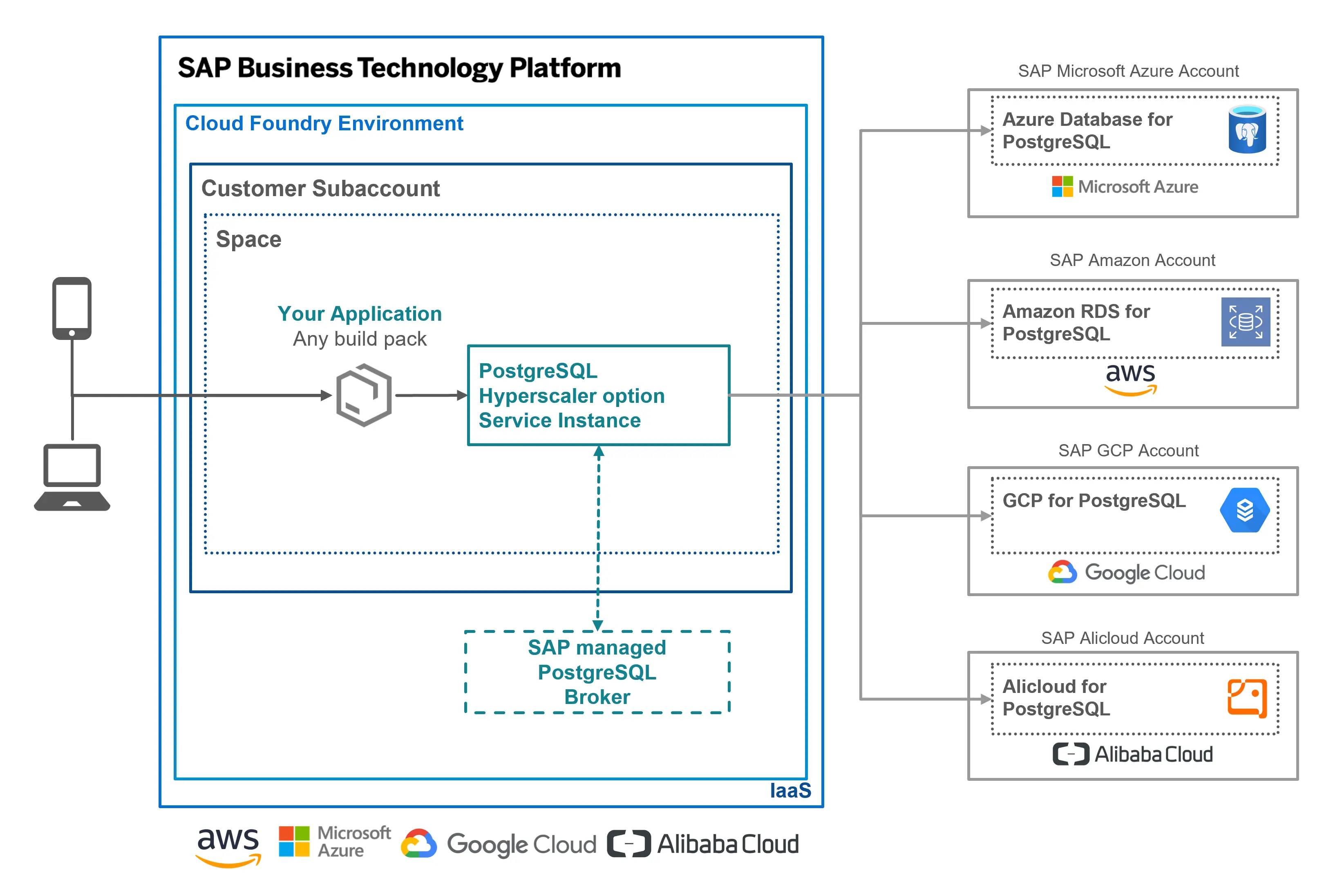
PostgreSQL on SAP BTP, hyperscaler option provides a managed relational database service, based on native PostgreSQL offerings from cloud providers AWS, Microsoft Azure, Google Cloud Platform and Alicloud. Using the PostgreSQL, hyperscaler option service, you can provision and manage PostgreSQL databases on hyperscalers (this service is specific to the IaaS layer - AWS RDS PostgreSQL, Azure Database for PostgreSQL, GCP Cloud SQL for PostgreSQL and Alicloud ApsaraDB RDS for PostgreSQL) from SAP BTP and bind them to your business applications running on the Cloud Foundry environment.
| Feature | Description |
|---|---|
| Secure data access | Consume PostgreSQL databases provisioned on hyperscalers in your business applications, with a secure networking setup designed for private and low-latency access. |
| Managed backup and restore | Turned on by default, automated backups enable you to restore your PostgreSQL database to any previous point in time. |
| High availability and Fault tolerance | With Multi-AZ deployments automatically provision and manage a “standby” replica in a different Availability Zone and protect your databases against unplanned outages with automatic failover. |
| Flexible scaling | Scale your databases flexibly based on application compute or storage requirements. |
| Extend your database functionality | Experience more with your PostgreSQL databases with the support of PostgreSQL extensions. |
How to get started?
Find relevant SAP Community Blogs.
Prerequisites & Setup
Before you can provision a PostgreSQL database, your SAP BTP subaccount must be entitled to the service and the runtime environment must be prepared.
BTP Entitlements
Make sure the following prerequisites are met in your SAP BTP subaccount:
- You have a global account and at least one subaccount on SAP BTP.
- The Cloud Foundry (or Kyma) environment is enabled in your subaccount, so you can create service instances and bind them to your applications.
- Your subaccount is entitled to PostgreSQL, hyperscaler option.
A PostgreSQL instance is assembled from two building blocks — a compute plan and a storage plan. You assign the corresponding entitlements to your subaccount via Entitlements in the SAP BTP cockpit:
| Service Plan | Type | Purpose |
|---|---|---|
free | Compute | Free plan for non-productive use (2 GB memory, 5 GB storage). Community support only, not subject to SLAs. |
standard | Compute | Compute resources for a PostgreSQL instance, provided in incremental instance sizes based on the IaaS provider. |
premium | Compute | Higher-tier compute. Multi-AZ (HA) is enabled by default. Recommended for productive usage. |
storage | Storage | Elastic disk storage for a single-node (non-HA) instance, including backup storage. |
storage_ha | Storage | Elastic disk storage for an HA instance (primary + secondary), including backup storage. |
Combining compute and storage plans
To provision a (non-free) instance, you need entitlements for both at least one compute plan (standard or premium) and at least one storage plan (storage or storage_ha). A non-HA instance consumes storage units, while an HA instance consumes storage_ha units. Both storage plans can be combined with either the standard or premium compute plan. For productive workloads, HA (Multi-AZ) instances are strongly recommended.
Support
| Component Name | Component Description |
|---|---|
| BC-CP-BSB-POSTGRESQL | Support component for this service |