
Appearance
Application Frontend Service
Host, serve, and manage frontend applications to extend SAP business solutions.
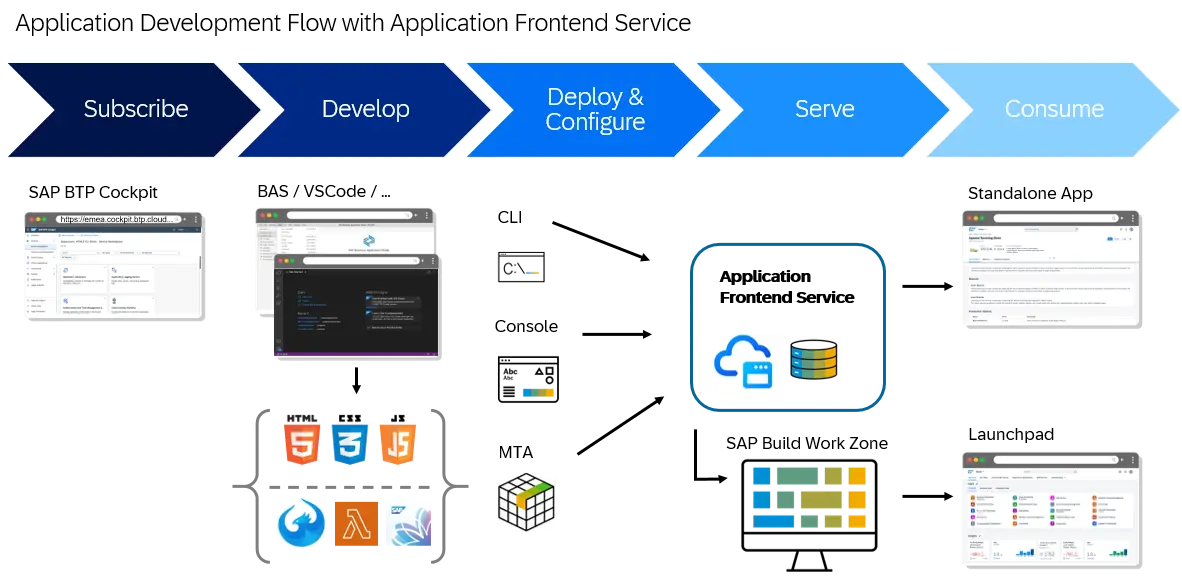
Application Frontend service lets you host and serve frontend applications. It serves as a single entry point for hosting web-based UI applications to extend SAP's business solutions. The service provides tools for deploying and managing applications, serving static resources, routing backend calls to defined targets, and observability tools.
| Feature | Description |
|---|---|
| Use a single point of entry | Use the Application Frontend service as a single point of entry for end-to-end hosting, serving, and managing frontend UI applications. |
| Manage apps with direct commands | Manage your applications in a direct manner using a command line interface (CLI). |
| Manage apps in the SAP BTP cockpit | Access the Application Frontend service UI in the SAP BTP cockpit to view and manage your applications. Get access to application logs, change active versions, and download or upload your applications. |
| Benefit from an extended versioning | Test new versions of your application without disrupting the user experience by maintaining multiple versions accessible via dedicated links. Change the main active version according to your needs. |
| Onboard with multi-cloud compatibility | Benefit from the service's compatibility with the existing development model used in the multi-cloud foundation of SAP BTP to enable a seamless onboarding. |
| Benefit from multitenancy support | Use this service in tenant-aware (multitenant) applications. Run them on a shared compute unit that can be used by multiple consumers (tenants). |
How to get started?
Find relevant SAP Community Blogs.
Prerequisites & Setup
Before you can deploy an application, your SAP BTP subaccount must be entitled to the service and users must be authorized via role collections.
BTP Entitlements
Before setting up the Application Frontend service, make sure the following prerequisites are met in your SAP BTP subaccount:
- You have a global account and at least one subaccount on SAP BTP.
- Your subaccount has a trust relationship with the Identity Authentication service (IAS).
- Your subaccount is entitled to the Application Frontend service.
The service offers the following entitlements (service plans), which you assign to your subaccount via Entitlements in the SAP BTP cockpit:
| Service Plan | Type | Purpose |
|---|---|---|
free | Subscription | Free plan to try out the Application Frontend service. The entitlement is available without a commercial contract. |
build-default | Subscription | Deploy, manage, and consume frontend UI applications. Dedicated plan for SAP Build, enabling AI-based development and automation. Subscribe to this plan to enable the service UI in the cockpit. |
developer | Service instance | Optional plan to deploy, modify, and delete frontend UI applications and their versions using service instances. Required for deploying multi-target applications with the Generic Application Content Deployer (GACD). |
INFO
For MTA content deployment with the GACD module, create a service instance of the Application Frontend service using the developer plan. Interactive deployment via the CLI works with the build-default (or free) subscription. On subscription, a demo application (appfrontdemo) is automatically provisioned so you can try out the service.
User Roles
To authorize users, create role collections in the SAP BTP cockpit (under Security › Role Collections) and add the corresponding role templates. These roles apply to design-time actions only — they are not enforced on end users of the hosted applications.
| Role Template | Role Collection | Authorization |
|---|---|---|
Application_Frontend_Developer | Application Frontend Developer | Deploy, update, and delete frontend applications using the Application Frontend service. |
Application_Frontend_Viewer | Application Frontend Viewer | Read-only access to view applications and their versions. |
Minimal Requirements for Applications
Regardless of the UI technology you use, your application must include certain basic files to deploy to the Application Frontend service.
manifest.json
This file contains the application's metadata, such as the application name, version, and business solution. It must have the following minimal structure:
json
{
  "sap.app": {
    "id": "<application name>",
    "applicationVersion": {
      "version": "<version name>"
    }
  }
}
For example:
json
{
  "sap.app": {
    "id": "myapp",
    "applicationVersion": {
      "version": "1.0.0"
    }
  }
}
Naming requirements
The following requirements apply to the application name and the version name:
- Application name: Must start and end with an alphanumeric character and contain only letters, numbers, underscores, dashes, and dots.
- Version name: Must contain only letters, numbers, underscores, dashes, and dots, and must end with a letter or a number. For example, you can give a snapshot version the name
1.0.1-SNAPSHOT. - The combined length of the application name (without dots) and the version name must not exceed 56 characters.
The manifest.json file should be in the same folder as the static UI resources. In a UI5 application, this is typically the webapp folder.
xs-app.json
The application routing configuration file contains the routing rules for the application. Routes determine which requests should be forwarded to which destinations. The basic routing configuration that xs-app.json should contain is:
json
{
  "routes": [
    {
      "source": "^(.*)",
      "target": "$1",
      "service": "app-front"
    }
  ]
}
Configuring the "routes" property
Please note the following when configuring the "routes" property:
- For
"service", you must use the value"app-front". - For
"authenticationType", you can use"ias","xsuaa", or"none":- If you use
"ias", the route is protected by the Identity Authentication service. - If you use
"none", no authentication is required for the route. Use"none"only to expose public information. - If you don't specify an
authenticationType, the application router will default to"ias".
- If you use
Here is an example of a route configuration:
json
{
  "source": "^(.*)$",
  "target": "$1",
  "service": "app-front",
  "authenticationType": "ias"
}
For more information about routes and other properties that you can configure in the xs-app.json file, see Application Routing Configuration File (xs-app.json).
Once your application contains the basic information, you can deploy it to the Application Frontend service using MTA content deployment or the Application Frontend service CLI.
UI Development Cycles
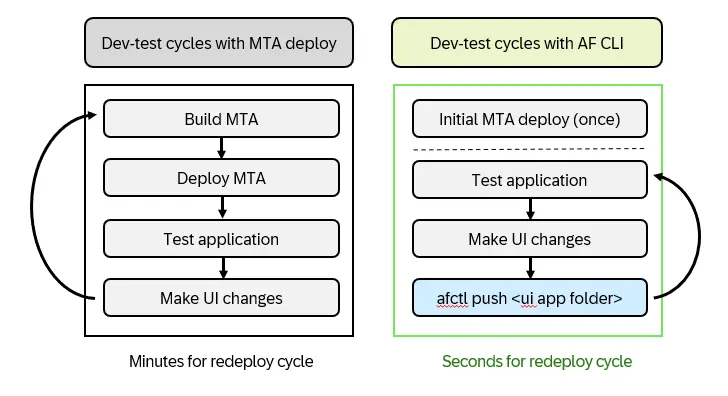
Application Frontend accelerates the development and testing of multitarget applications (MTAs) by enabling rapid UI updates through its CLI, bypassing the need for full MTA redeployment.
When developing applications for SAP BTP, it is always recommended to test your application locally in your development environment (IDE) as much as possible, as this provides the fastest dev-test cycles. However, as applications become more complex, testing them locally in your development environment becomes increasingly difficult. In these situations, deploying the application to the hosting service is a preferred approach for effective testing. If you use the multitarget application (MTA) concept to package and deploy your applications, repeatedly building and deploying the full MTA for each UI change can become particularly time-consuming and significantly extend your development and testing cycles.
With Application Frontend, you can shorten the cycle of development and remote testing of MTA applications. You achieve this by first deploying the application using MTA, and then redeploying any subsequent UI changes using the Application Frontend CLI. The CLI deployment process is substantially faster than a full MTA deployment, often completing in seconds rather than minutes, which dramatically accelerates your development workflow. Your benefits from this method are:
- Significantly faster testing cycles for UI changes
- No need to rebuild and redeploy the entire MTA package
- Reuse of existing service configurations and bindings
Note
With this method, the CLI automatically reuses the configuration data that was uploaded during the initial MTA deployment. For this to work properly, ensure that the application version in your UI updates is the same as the version deployed in the original MTA package.
AF CLI
The Application Frontend service CLI offers access to the APIs exposed by the Application Frontend service. It provides a comprehensive tool set for deploying and managing applications in Application Frontend service.
Run the command to install the CLI:
sh
npm install -g @sap/appfront-cliLog in
Log in to the Application Frontend service CLI to deploy and manage your applications using CLI commands.
sh
afctl login [-a URI] -ssoLog out
Log out to refresh btp security context.
sh
afctl logoutDeploy
Deploy your applications using the Application Frontend service CLI.
sh
afctl push app/MYAPP/distReusing Application Resources
The Application Frontend service lets you integrate resources from other applications directly into your own application's routing. This is useful when you want to share common UI assets across applications, or when your application needs to surface content hosted by another service.
Two reuse patterns are supported:
- Application-to-application reuse: Access static resources from another application deployed to the Application Frontend service in the same subaccount.
- Business service reuse: Access static resources from an SAP BTP service that exposes its own HTML5 applications via the SAP HTML5 Application Repository service (for example, SAP Build Process Automation).
How path rewriting works
In both patterns, path rewriting (source → target) and all other route-level evaluations — such as authorization scopes — are taken from the route of the target application (the one whose resources you reuse). If multiple routes match a request path, the first matching route in the routing configuration is used.
Application-to-Application Reuse
To access static resources from another application, add a route to your xs-app.json that points to the other application via the application property. Reuse is supported only between two applications deployed to the Application Frontend service within the same subaccount.
Reuse the currently active version of an application:
json
"routes": [
  {
    "source": "/lib/(.*)",
    "target": "/$1",
    "application": "lib"
  }
]
Reuse a specific version (e.g. 1.0.0) of an application:
json
"routes": [
  {
    "source": "/lib/(.*)",
    "target": "/$1",
    "application": "lib@1.0.0"
  }
]
Reusing Resources from a Business Service
Some SAP BTP services expose their own frontend applications through the HTML5 Application Repository service — these are referred to as business services. This reuse pattern is only supported for business services that host their UI through the HTML5 Application Repository service.
To reuse resources from such a business service, you configure a route and provide the service credentials.
1. Configure the route in xs-app.json with both an application property (target application name and version) and a service property (the technical name of the business service, as it appears in sap.cloud.service in the service credentials):
json
"routes": [
  {
    "source": "^/workflow/(.*)",
    "target": "/$1",
    "application": "cross.fnd.fiori.inbox",
    "service": "com.sap.bpm.workflow"
  }
]
2. Provide the service credentials. In the deployment configuration file used with the Application Frontend service CLI, add the business service credentials under com.sap.service-credentials. The credentials must contain an html5-apps-repo entry with an app_host_id:
json
{
  "com.sap.service-credentials": {
    "workflow": [
      {
        "credentials": {
          "sap.cloud.service": "com.sap.bpm.workflow",
          "html5-apps-repo": {
            "app_host_id": "d8e1f0b7-1234-5678-abcd-ef0123456789"
          }
        }
      }
    ]
  }
}
WARNING
If the service credentials are found but the service does not expose HTML5 applications (no html5-apps-repo.app_host_id present), the deployment fails with an error indicating that the business service does not expose a UI.
Alternatively, when deploying with the Generic Application Content Deployer (GACD) module in the Cloud Foundry CLI, declare the business service as a required resource in your mta.yaml. The deployer then injects the credentials automatically, so you don't need to enter com.sap.service-credentials manually:
yaml
modules:
  - name: app1-content-deployer-module
    type: com.sap.application.content
    path: .
    requires:
      - name: app-front-service
        parameters:
          content-target: true
      - name: workflow-service
        # Its credentials will be available for Appfront
    build-parameters:
      build-result: resources
      requires:
        - artifacts:
            - app1.zip
          name: app1
          target-path: resources/

resources:
  - name: workflow-service
    type: org.cloudfoundry.managed-service
    parameters:
      service: workflow
      service-name: app1-workflow-service
      service-plan: standard
Support
| Component Name | Component Description |
|---|---|
| BC-CP-AF | Support component for this service |