
Appearance
SAP Cloud Identity Services
Мanage identities, authorizations and SSO across cloud and on-premise solutions.
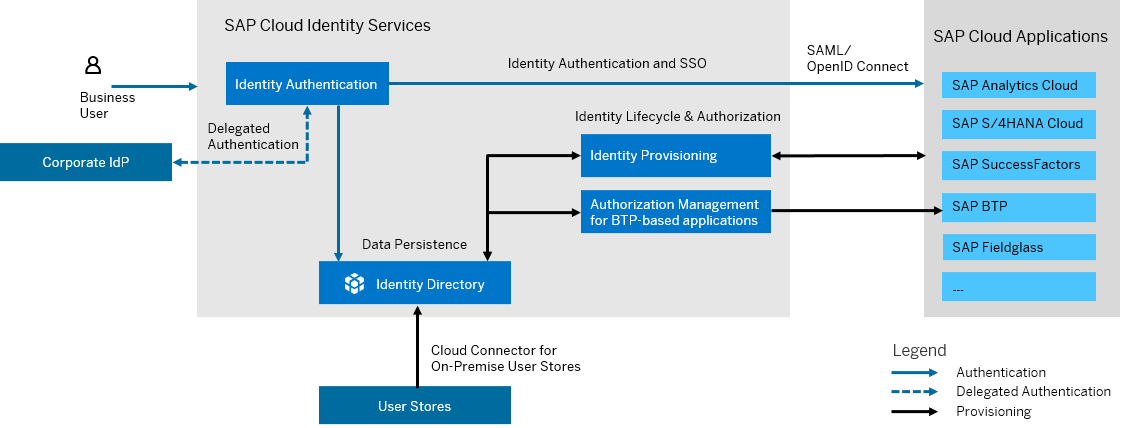
SAP Cloud Identity Services are a group of services of SAP Business Technology Platform (SAP BTP), which enable you to integrate identity and access management between systems. The goal is to provide a seamless single sign-on experience across systems while ensuring that system and data access are secure. SAP Cloud Identity Services include Identity Authentication, Identity Provisioning, Identity Directory and Authorization Management.
| Feature | Description |
|---|---|
| Authentication and SSO | Choose one of the supported authentication methods to control access to your application, like Form, SPNEGO, Social, or 2FA. Use OpenID Connect or SAML 2.0 to provide single sign-on. Integrate your application programmatically using authentication via API. |
| Risk-Based Authentication | Help enforce two-factor authentication based on IP ranges, user groups, user type, or authentication method to manage access to a business application. |
| Delegate Authentication | Delegate authentication to a 3rd party or on-premise IdP, as default or based on a condition like IdP, email domain, user type or user group, and thus enable SSO across on-premise and the cloud. |
| Policy-Based Authorizations | Develop SAP BTP applications with instance-based authorizations. Configure those instance-based authorizations centrally as policies within SAP Cloud Identity Services. |
| Data Persistence | Store and manage users and groups in identity directory - the user store of SAP Cloud Identity Services. |
| User and Group Provisioning | Synchronize users and groups between multiple supported cloud and on-premise systems, both SAP and non-SAP. Filter data. Run jobs in full and delta read mode. |
| Job Logging and Notifications | View and manage job logs and real-time provisioning logs. Subscribe to source systems and receive notifications for the status of provisioning jobs. |
| User and Group Management via API | Use SCIM REST API to manage users and groups, invite users, customize end-user UI texts in any language. |
How to get started?
Find relevant SAP Tutorials for Developers or SAP Community Blogs.
Prerequisites & Setup
Before you can use SAP Cloud Identity Services, your SAP BTP subaccount must be entitled to the service so that you can provision a tenant, and administrators must be set up in the tenant's Administration Console.
BTP Entitlements
Make sure the following prerequisites are met in your SAP BTP subaccount:
- You have a global account and at least one subaccount on SAP BTP.
- Your subaccount is entitled to SAP Cloud Identity Services.
- You have subaccount administrator authorizations to run the self-service tenant provisioning.
The service offers the following entitlements (service plans), which you assign to your subaccount via Entitlements in the SAP BTP cockpit:
| Service Plan | Type | Purpose |
|---|---|---|
default | Subscription | Self-service request in the SAP BTP cockpit to provision your default productive and test tenant. Productive and test tenants are technically and functionally identical. A tenant of a given type is created only if none of that type is already bound to your customer ID. |
additional-tenant | Service instance | Provision additional tenants beyond the default productive and test tenants (for example, for further staging or separation). Charged per tenant. |
application | Service instance | Create service instances that let SAP BTP applications consume Identity Authentication (for example, as the OpenID Connect / SAML identity provider) and configure application-specific authentication. |
Logon-based charging
Logon requests coming from SAP solutions and applications running on SAP BTP are free of charge. Only successful authentications from non-SAP solutions are charged (metered in blocks of logons). See the SAP Discovery Center for the current pricing model.
Administrators
The initial administrator of a newly provisioned tenant is set up during onboarding. Further administration — such as managing administrators, trust configuration, applications, and users — is done in the Administration Console of the Identity Authentication tenant (https://<tenant>.accounts.ondemand.com/admin), not through SAP BTP role collections.
CAP Integration
For SAP Cloud Application Programming Model (CAP) applications, SAP Cloud Identity Services provides the two building blocks of access control end to end: Identity Authentication (IAS) answers who is the user, and Authorization Management (AMS) answers what is the user allowed to do. When the UI is served through the Application Frontend service, the same IAS identity flows all the way from the browser to the CAP backend, so authentication happens once and the token is propagated to every layer.
The @sap/ams and @sap/ams-dev packages
CAP integrates with Authorization Management through two npm packages that cds add ams wires into the project:
| Package | Scope | Purpose |
|---|---|---|
@sap/ams | dependencies (runtime) | CAP runtime plugin that enforces AMS at request time. It maps the CAP roles from your @requires / @restrict annotations to AMS policies, pulls the user's assigned policies from the IAS token, and evaluates instance-based (attribute) restrictions written in DCL. |
@sap/ams-dev | devDependencies (design time) | Tooling for local development and testing: compiles the DCL policies, ships a local AMS test server, and lets you assign policies to mock users so authorization can be verified with cds watch — no deployed IAS/AMS tenant required. |
Setup in a CAP project
- Add authentication (IAS) so the service validates IAS-issued tokens (mTLS):sh
cds add ias - Add authorization (AMS) — this adds
@sap/ams/@sap/ams-dev, the DCL build tasks, and, if needed, the IAS configuration:shcds add ams
Both commands extend mta.yaml with a binding to the identity service (service plan application) — this is the service instance of SAP Cloud Identity Services through which IAS authentication and AMS policy management are consumed:
yaml
resources:
  - name: bookshop-ias
    type: org.cloudfoundry.managed-service
    parameters:
      service: identity
      service-plan: application
      config:
        display-name: bookshop
From CAP roles to AMS policies
You model CAP roles and restrictions in CDS as usual — AMS reuses exactly these annotations, so no separate authorization model is required:
cds
service AdminService @(requires: ['ManageAuthors', 'ManageBooks']) {
  entity Books @(restrict: [
    { grant: ['READ'], to: 'ManageAuthors' },
    { grant: ['READ', 'WRITE'], to: 'ManageBooks' } ])
  as projection on my.Books;
}
For instance-based (attribute) authorization, expose domain attributes to AMS with @ams.attributes. Business administrators can then reference them in policies to grant access to specific data slices:
cds
annotate AdminService.Books with @ams.attributes: {
  Genre: (genre.name)
};
The build generates DCL artifacts (ams/schema.dcl, base policies) from these annotations. Custom, attribute-restricted policies build on the generated base policies and are assigned to users in the IAS Administration Console:
dcl
/* Generated base policy (ams/cap/basePolicies.dcl) */
POLICY StockManager {
  ASSIGN ROLE ManageBooks WHERE Genre IS NOT RESTRICTED;
}

/* Custom, instance-restricted policy */
POLICY StockManagerFiction {
  USE cap.StockManager RESTRICT Genre IN ('Mystery', 'Fantasy');
}
End-to-end picture
Application Frontend service hosts and routes the UI with authenticationType: ias → IAS authenticates the user and issues the token → CAP validates the token (@sap/xssec) and enforces authorization via @sap/ams against the AMS policies. One identity, one authorization model, checked at every hop.
See the CAP documentation on Authentication and CAP-level Users & Roles / AMS for details.
Support
| Component Name | Component Description |
|---|---|
| BC-IAM-OID | Support component for this service |